

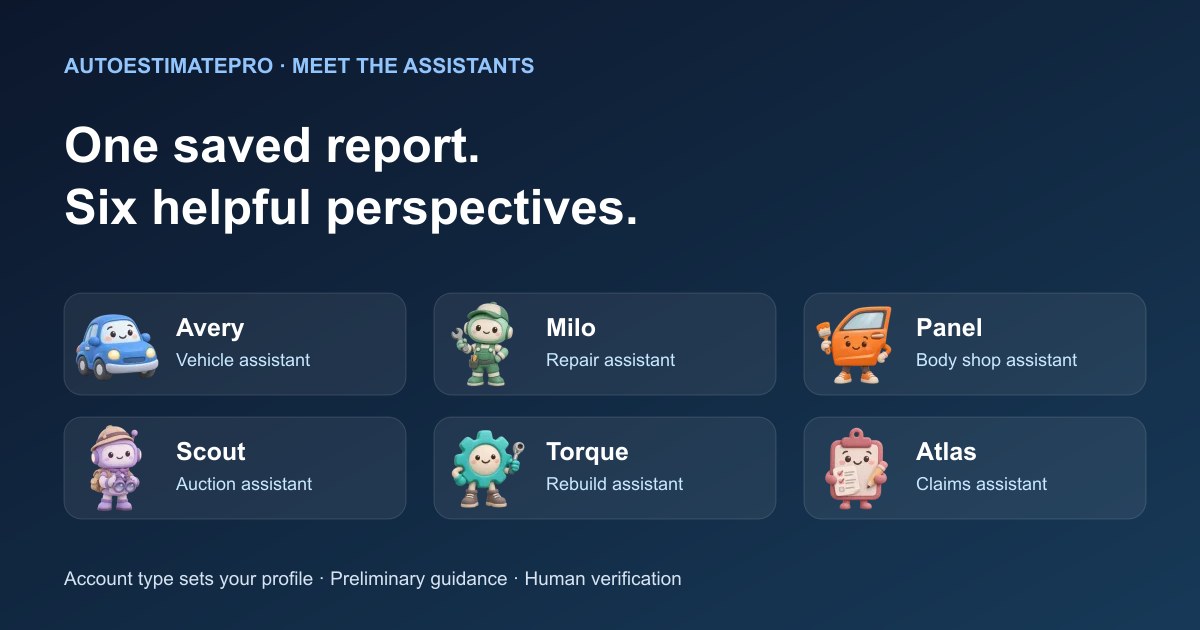
The best next step after a preliminary repair report is a focused question with the right context. A total tells you what the current calculation adds up to. It does not explain every assumption, resolve an unpriced finding or tell the next person what to inspect. AutoEstimatePro's six assistant profiles help you work through that conversation: Avery for vehicle questions, Milo for repair questions, Panel for body-shop discussions, Scout for auction planning, Torque for rebuilding and Atlas for claims documentation.
Your account type determines the active profile. These are different role-focused explanations within the app, not a panel of six independent reviewers. You can review your account type in Profile when your needs change. Attach a saved report owned by your account, choose from 12 ready questions or write your own, and explain the decision you are trying to make. Assistant conversations do not use report credits. Creating a new repair analysis remains a separate report action with its own access requirements.
This guide uses one fictional repair scenario to demonstrate useful questions and handoffs. It does not show an actual assistant transcript, inspected customer vehicle or promised outcome. The example prompts are editorial suggestions you can adapt. AutoEstimatePro LLC publishes this guide and provides the app; the underlying discipline of recording evidence and open questions also works without an AI assistant.
Start with the decision, not an unrestricted request
Before opening a conversation, complete a simple sentence: “I need to decide whether to ___, and I do not yet know ___.” An owner booking a repair, a shop explaining an estimate and a buyer evaluating a rebuild have different next steps even when they are looking at the same damaged bumper. Naming the decision gives the assistant a useful boundary and helps you recognize an answer that wanders away from the job.
Include the report's date, the part of the report you are asking about, and any later information you want considered. If you received a written shop estimate after generating the report, say so and provide the relevant details yourself. Do not assume the assistant has fetched the latest estimate, looked up a live listing or examined additional photos. An attached report supplies context; it does not make unavailable evidence appear.
Keep a short note outside the conversation containing the result you intend to use. For example: “Ask the repairer whether the lamp quote includes its module; confirm the unpriced bracket; request a scoped labor explanation.” You now have something specific to carry into a call. A long explanation can be informative, but a short, attributable action list is easier to verify and update.
Avery: make the existing report understandable
Avery is the vehicle assistant, useful when your first task is understanding the report. Begin with the unfamiliar terms or confusing organization. Ask for a plain-language explanation of what is included, what is inferred and what remains unpriced. A good request preserves uncertainty instead of asking the assistant to convert every line into a confident repair instruction.
Try: “Explain the difference between the visible findings, related findings and inferred findings in my saved report. For each group, tell me what question I should ask a professional.” Then compare the answer with the original report. If a summary uses stronger language than its source, correct the conversation. An item described as possible should not quietly become confirmed because its wording has been simplified.
The useful output is an explanation you can repeat accurately. You might write down that a line with no price needs clarification, that a proposed replacement is preliminary, and that a vehicle identity description is different from its repair history. Avery's role focus is a starting point for those questions; it is not evidence that the car has been physically checked.
Milo: turn repair concerns into inspection questions
Milo is the repair assistant. Consider a fictional owner whose report includes visible damage to a bumper cover, a proposed lamp replacement and a possible bracket issue that has not been priced. The owner wants to arrange a repair, not calculate resale profit. Ask Milo to organize the unresolved concerns into questions for the repair appointment.
A useful prompt is: “Based on this report, which findings need inspection before I rely on the repair scope? Separate questions about the visible parts from questions about access, included components and unpriced items.” The output should help the owner ask what the shop will inspect and what the estimate process involves. It should not be treated as permission to disassemble the vehicle or a determination that a particular repair method is appropriate.
Next, add the repairer's actual response. If the shop says it needs access before pricing the bracket, retain that condition in your notes. Do not ask for an invented final amount to fill the blank. The FTC's repair guidance encourages consumers to understand written estimates and authorization arrangements. Use Milo to prepare that conversation, then get the scope and approval process from the business doing the work.
Panel: prepare a clear scope conversation
Panel is the body-shop assistant. Its focus is useful when a report needs to become a clear intake or customer conversation. The same fictional bumper-and-lamp report may be easy for an estimator to scan yet difficult for an owner to interpret. Ask for separate explanations of the preliminary findings, the items needing verification and the information still required from the customer.
For example: “Draft a short explanation of this report for a customer. Keep observations separate from proposed work, do not promise a final price, and end with the questions we need to resolve during inspection.” Review the result against the report and the shop's own procedures before using it. The person responsible for the estimate should correct unsupported statements and supply the actual terms.
A second useful task is comparison preparation. If one document lists a complete lamp assembly and another lists a housing, ask Panel to identify the distinction in the information you supplied. Do not ask which provider is overcharging based only on different totals. The useful handoff is a specific question about included parts or operations, with the documents and dates attached to your own record.
Scout: challenge the inputs before a buying decision
Scout is the auction assistant. The report becomes one input in a purchase decision, alongside fees, transport, value assumptions and unresolved damage. Ask what information is missing before requesting a maximum-bid scenario. A precise result from incomplete assumptions is still incomplete planning.
Suppose a buyer supplies a purely illustrative acquisition ceiling of $7,000 and separate planning allowances of $2,000 for repairs, $700 for fees and $500 for transport. Subtraction leaves $3,800 for the vehicle before any other required expenses or reserve. Those figures are fictional, not market quotes. This subtraction is an editorial teaching example, not a chat calculation. In the app, supply verified inputs to Calculate all-in and ask Scout to explain the completed result and any omitted assumptions. If the repair allowance changes, rerun the calculator before asking about the revised result. Check which expenses change with the bid rather than treating every allowance as fixed.
Scout's featured optional max-bid and all-in cost tools are calculation aids that need the relevant inputs. They do not research live auction inventory, place a bid or guarantee a return. Supply verified figures and keep the unanswered questions next to the output. If an auction listing or fee schedule changes, update the evidence before relying on an earlier conversation.
Torque: organize a rebuild into questions and dependencies
Torque is the rebuild assistant. A rebuild plan often involves several people, suppliers and stages. The useful question is not simply “Can this be fixed?” A preliminary report cannot establish that. Ask which assumptions need professional inspection, which components need fitment confirmation, and which decisions depend on information you do not yet have.
Using the fictional lamp example, a parts choice may affect what must be supplied, inspected or configured during the job. Ask Torque to make a dependency list from the information you provide: confirm the vehicle configuration, obtain the repairer's scoped requirements, verify the candidate assembly's contents, then update the budget. This is an organizational exercise, not a substitute for vehicle-specific repair instructions.
Torque also presents optional max-bid and all-in cost planning tools. Keep those financial scenarios tied to the technical unknowns. A lower purchase price does not establish repair feasibility. A completed question list should make it easier to see which decisions can proceed and which need a qualified answer before you buy components or authorize work.
Atlas: separate documentation from claim decisions
Atlas is the claims assistant. Its useful role is organizing observations, documents and questions for a claims conversation. A report marked Insurance is still a preliminary report; it does not establish coverage, authorize a repair, approve a supplement or decide who must pay. Keep those decisions with the relevant people and documents.
Ask: “Summarize the reported observations, the unresolved repair questions and the documents I should discuss with the repairer or insurer. Do not infer coverage from the report.” If you later provide a revised estimate, ask for a dated comparison of the supplied versions. Review every statement against the actual documents before forwarding or relying on it.
For the fictional bracket issue, the record might say that the preliminary report flagged a possible item, the shop subsequently supplied an inspection finding, and the revised estimate requests additional work. Keep the evidence, requested change and approval status separate. Atlas can help structure the explanation, while the shop and insurer explain their respective processes. It cannot resolve a policy dispute from a report label.
One scenario, several useful outputs
Imagine the vehicle owner collects three pieces of information: the saved preliminary report, a written shop estimate, and a supplier's description of a lamp assembly. A useful conversation begins by identifying which document supports each statement. The report raises a question about the bracket. The shop estimate describes its proposed scope. The supplier description says what is included in the part. None automatically proves the other two correct.
The role-focused handoffs differ. Avery helps the owner understand the vocabulary. Milo helps prepare the inspection questions. Panel helps the shop explain its scope. Atlas helps organize the version history for a claims conversation. If the vehicle is instead a purchase prospect, Scout and Torque help structure buying or rebuilding assumptions. You do not need six chats to make progress; use the profile suited to your account and the decision in front of you.
Finish with an action record containing four fields: the question, the evidence already available, the person who can verify it and the next response you need. “Does the lamp price include the module?” is more useful than “Find cheaper parts.” “What operation was added and why?” is more useful than “Why is this estimate high?” Specific questions create a clearer route from explanation to evidence.
Keep useful boundaries in every conversation
Do not treat VIN identity, public history and recalls as interchangeable. A decoded vehicle description helps establish identity; it is not a comprehensive history report. If recall status matters, follow the official individual-VIN check. NHTSA explains the difference between VIN-specific unrepaired-recall results and general vehicle searches. An assistant's explanation of a saved report cannot supply missing or newly changed source records by itself.
Do not ask chat to approve driving, repairs or a purchase based on photographs. A saved report can contain useful findings and still miss hidden damage. For vehicle-specific procedures, ask the qualified professional to identify the appropriate manufacturer information. I-CAR's calibration resource points repairers toward applicable OEM information; it is not a universal instruction that every photographed repair needs the same operation.
Keep sensitive details limited to what is needed for the question and review anything you plan to share. A report attachment does not grant the assistant authority to contact a shop, negotiate a claim or authorize work. Use the output as a draft explanation or question list, check the underlying evidence, and make the actual communication through your chosen process.
Start with one report and one question
Open your saved report, identify your immediate decision and ask for a small useful result: an explanation, a comparison checklist, a list of missing inputs or a concise handoff. Check the answer against the report before adding more questions. The 12 ready questions provide starting points; your own context makes the conversation more specific.
For the complete evidence and cost workflow, read our photo estimate to body-shop planning guide. Explore the iPhone app or Android app for current access and features. If you are comparing repair businesses, the companion AutoRepairEstimate.ai shop-conversation guide focuses on using Panel, Milo and Atlas to prepare a useful discussion. Both websites are operated by AutoEstimatePro LLC.